
An AI review reply generator writes a draft when you paste in a review. Automatic review-reply software connects to your Google Business Profile and manages what happens next: which reviews are eligible, which ones wait for approval, when a reply can publish, and who sees an exception.
Both can be useful. The right choice depends on whether the job is occasional writing help or a repeatable operating workflow.
What a reply generator does well
A generator is useful when a business wants help drafting one response at a time. You can paste a review, choose a tone, edit the suggestion, and publish it yourself. It is a good fit when:
- review volume is low;
- every reply needs the owner’s attention anyway;
- the business is testing its preferred tone;
- there is no need to connect a Google Business Profile.
FullReviews offers a free AI Google review response generator for this use case. It is a writing tool, not a promise that a reply will be posted automatically.
What automatic review-reply software adds
A connected product needs more than a text box. It should make the publishing policy visible and give the business control over it. The practical questions are:
- Does the business choose which star ratings are eligible for automatic publishing?
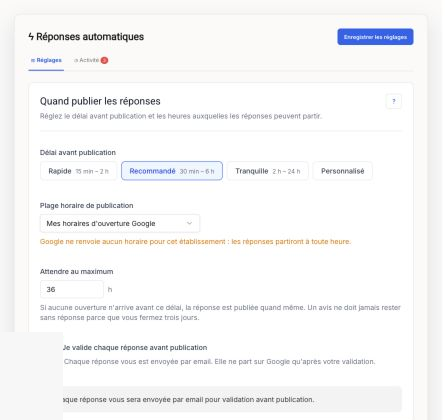
- Can it set a delay and business-hour window instead of replying instantly?
- Are legal, health, safety, aggressive-language, and staff-name cases held as drafts?
- Can a manager edit, approve, decline, or escalate an exception?
- Can the system use approved business replies as style guidance?
- What happens to old, unanswered reviews?
FullReviews is designed for that narrower workflow: Google Business Profile review replies with a business-selected threshold, scheduling controls, style guidance, and a human-review route for flagged replies. It is not a broad reputation-management suite with listings, social monitoring, surveys, and multi-channel reporting.
Automation is a policy, not a toggle
“Automatic” should not mean “publish every draft.” A cautious setup might draft every review, auto-publish only a routine eligible class, and hold anything negative, sensitive, or ambiguous. The business chooses its own threshold and can revise it after reviewing actual results.
For example, a local business can use AI to produce drafts for all new Google reviews, schedule ordinary approved replies during business hours, and keep lower ratings or safety-flagged reviews for a manager. That reduces repetitive work without making a generic public reply the default for difficult feedback.
Read the detailed automatic-reply setup guide and the approval-rules playbook before turning on publishing.
Which option should you choose?
Choose a generator if you want a quick draft and will manually decide, edit, and post each reply.
Choose automatic review-reply software if the recurring task is to respond to Google reviews consistently, with rules for timing, approval, and exceptions. A connected workflow is especially useful once reply volume makes copy-paste and manual posting unreliable.
Neither option guarantees a better Google ranking, a higher rating, or a particular customer outcome. The point is to make the response process more consistent and accountable.
Try the workflow before committing
Use the free generator to test a tone on a real review. If you need connected publishing rules, review the FullReviews product reference, pricing, and the focused tool comparison. The self-serve trial is 30 days and does not require a card.
