
There are two very different categories hidden behind “AI review management.” Some products are broad reputation-management suites. Others are focused on one job: helping a local business reply to Google reviews consistently and without a large monthly software bill.
This is the second category. We compared public product and pricing pages for tools that position AI Google review replies as a core workflow. We did not run a controlled live test of every product, and this page is published by FullReviews, so treat it as a transparent starting point rather than an independent benchmark. Product capabilities and prices change; follow the source links before deciding.
What matters for a focused Google-review workflow
The basic ability to generate copy is table stakes. The harder operational questions are:
- Can a clearly positive review publish without manual work?
- Can sensitive or negative reviews be held for approval?
- Can the business control timing and voice?
- Is pricing understandable for a single location?
Shortlist
| Tool | What its public materials emphasize | Automation and approval | Published price context |
|---|---|---|---|
| FullReviews | Focused Google Business Profile reply workflow | Rules can auto-publish eligible replies; flagged or escalation-prone reviews wait for a person | Outside the euro area: US$16 monthly, or US$9.99/month billed annually (US$119.88/year). Euro area: €14 monthly, or €9.99/month billed annually (€119.90/year) |
| RepliFast | Focused Google review replies with a manual-review Starter plan and an Autopilot Pro plan | Its pricing page says Pro can auto-post 4- and 5-star replies while holding 1- to 3-star reviews for review | Starter: $12/month billed annually ($144/year), or $15 monthly. Pro: $19/month billed annually ($228/year), or $29 monthly |
| Cinquo | CINTIA, an agent for Google review replies | Its automation page says positive reviews can be auto-responded to while sensitive feedback is left for approval | Check its current site for a public recurring-price quote |
| ReplyChampion | Google review management for small businesses | Its pricing page describes AI replies and approval controls before posting; verify the exact automatic-publishing rules before paying | $10/month for 1–2 locations, or $100/year, on the published pricing page |
| Reviewflowz | A broader review-management platform with an AI reply workflow | Its help center says Pro and above can apply rules that post, hold, or ignore a reply; Google is a direct-posting platform | Its help center stated $45 per location/month when this page was updated; confirm the current plan |
The table reports what each company says publicly. “Approval” can mean a different workflow from one product to another: approve every draft, approve only a class of reviews, or route work through a shared inbox. Check the relevant help page, product settings, or self-serve trial before paying.
Head-to-head pages: FullReviews vs RepliFast, FullReviews vs Cinquo, FullReviews vs ReplyChampion and FullReviews vs Reviewflowz.
How the options differ
The notes below are deliberately practical. “Advantages” describes what the linked public material establishes; “trade-offs” means either a real limitation or a detail to verify from the product settings, help docs, or a self-serve trial. It is not a scorecard or a claim that we tested every connected product.
FullReviews: focused rules and an explicit safety lane
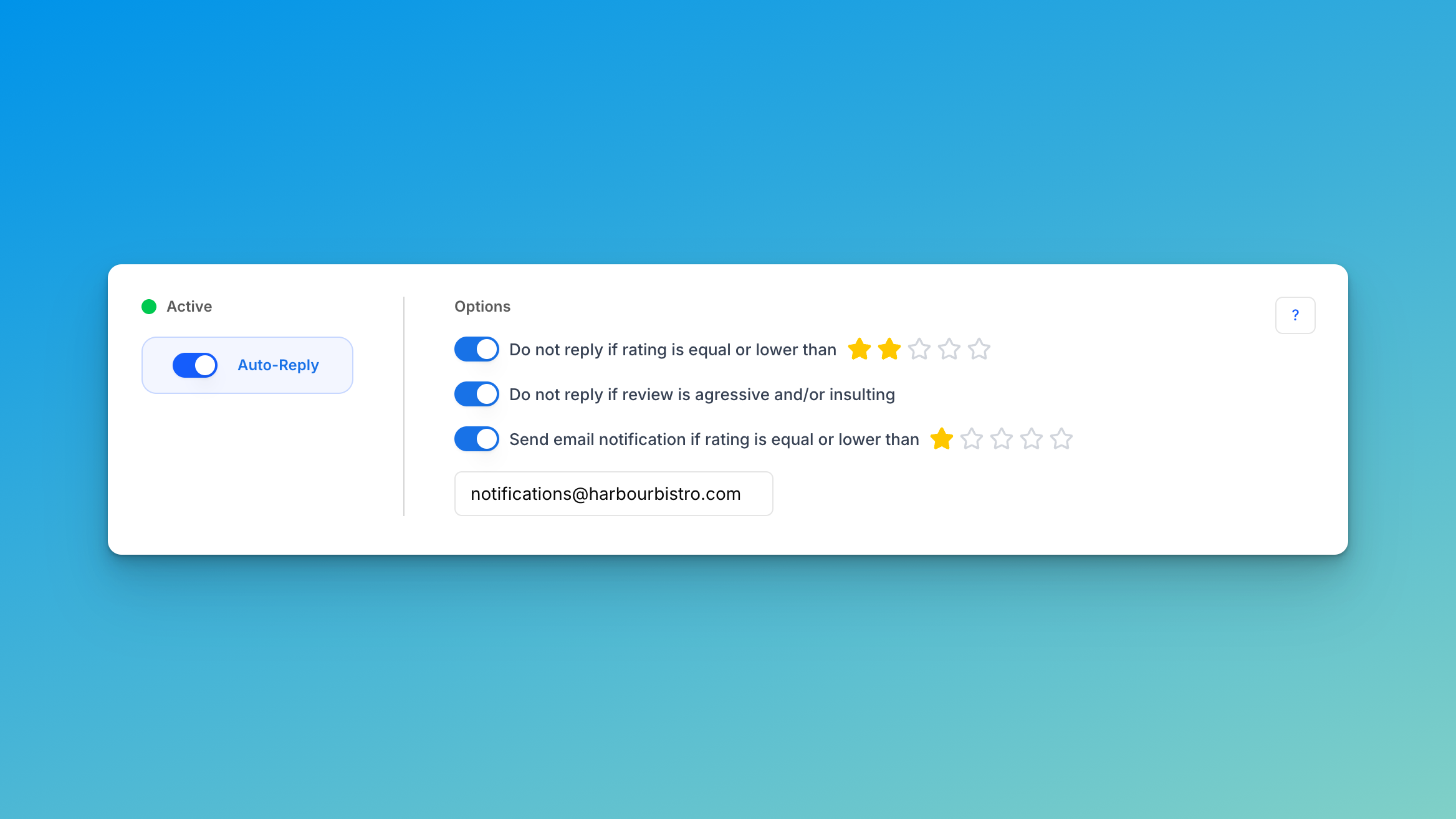
Best for: a local business that wants the routine work handled automatically while meaningful exceptions stop for a person.
Advantages
- Google Business Profile is the core workflow, rather than one channel in a larger reputation suite.
- Publishing rules, timing, and a style profile built from approved replies make the starting workflow concrete.
- Reviews involving legal threats, health or safety concerns, aggressive language, or staff names are held for human review.
Trade-offs to consider
- It is intentionally specialized. A team that needs broad social listening, listings management, surveys, or multi-source reporting should assess a broader platform too.
- A cautious team should still approve the first batch, then expand the auto-publish rules from real examples.
Price and setup
Outside the euro area, FullReviews costs US$16 per active location monthly, or US$9.99 per location/month billed annually (US$119.88/year). In the euro area, it costs €14 monthly, or €9.99 per location/month billed annually (€119.90/year). A sensible first configuration is to auto-publish eligible positive reviews and hold everything sensitive. See the product reference, pricing, and setup guide.
RepliFast: focused Google replies with an Autopilot tier
Best for: an owner who wants a focused Google-review tool and a plan that separates manual approval from automated publishing.
Advantages
- Its public pricing clearly distinguishes Starter, where an owner reviews replies, from Pro, where Autopilot is available.
- The pricing page says Pro can auto-post 4- and 5-star replies while 1- to 3-star reviews wait for review.
- It has published detailed category content, which makes the intended workflow easy to understand before a trial.
Trade-offs to consider
- Autopilot is not on Starter, so the entry price is not the relevant number for a business that needs automatic publishing.
- Its public materials establish rating-based controls; confirm the exact handling for legal, safety, staff-name, and brand-sensitive cases before buying.
Price and setup
Starter is $12/month billed annually ($144/year), or $15 monthly. Pro is $19/month billed annually ($228/year), or $29 monthly. Confirm current entitlements directly with RepliFast before buying.
Cinquo: positive-review automation with an approval gate
Best for: a business that wants an agent dedicated to Google-review replies and wants sensitive feedback routed to a person.
Advantages
- Cinquo positions CINTIA specifically as an agent for Google review replies.
- Its automation page states that eligible positive reviews can be auto-responded to while sensitive feedback waits for approval.
Trade-offs to consider
- We did not find a public recurring-price quote in the source material checked for this article.
- Check the eligible-rating rules, sensitive-topic filters, and what happens after a rule blocks a reply before subscribing.
Price and setup
Check Cinquo’s current site for pricing and the exact configuration available for your locations.
ReplyChampion: low published entry price with approval controls
Best for: a small business that wants a lower published starting price and can verify the automation details before subscribing.
Advantages
- Its pricing page describes AI replies and approval controls before posting.
- The published entry price is easy to evaluate for one or two locations.
Trade-offs to consider
- The pricing page alone does not establish which star ratings, if any, can publish automatically without approval.
- Confirm the escalation rules, publishing delay, and per-location limits before treating the entry price as comparable to an autopilot plan.
Price and setup
$10/month for 1–2 locations, or $100/year, on the published pricing page. Before paying, confirm which reviews can publish automatically and which reviews are held for approval.
Reviewflowz: broader review operations with AI reply rules
Best for: a team that also needs review aggregation, reporting, or multiple review sources in addition to responding to Google reviews.
Advantages
- Its AI-reply workflow is part of a broader review-management product, which can reduce tool sprawl for a multi-channel team.
- Its help center says Pro and above can apply rules that post, hold, or ignore a reply; Google is a direct-posting platform.
Trade-offs to consider
- The broader scope may be more product and budget than a single-location business needs when the job is only safe, automatic Google-review replies.
- Its help center stated $45 per location/month when this article was updated; confirm the current plan and rule limits.
Price and setup
See current Reviewflowz pricing and verify the plan that includes the automation controls you need.
What to check before subscribing
Use the product pages, help docs, and any self-serve trial to verify these seven points in a few minutes:
- Which star ratings can publish automatically?
- What words, topics, or categories force approval?
- Can I prevent replies to a named staff member or a legal complaint?
- Can I set business-hour windows and a delay?
- Can I edit the system’s writing style from my own approved replies?
- Is the listed price per location, per user, or for an account?
- What happens to old, unanswered reviews?
A practical starting decision
Choose a focused tool when the recurring job is “reply well to Google reviews with safe exception handling.” Choose a broader platform when monitoring many channels, analytics, surveys, listings, and team workflows are the primary need.
For a cautious rollout, start with approval for every reply, then auto-publish only the type of feedback your team has reviewed repeatedly. Our approval-rules playbook explains how to set that boundary, and our brand-voice guide covers the copy side.
